
 TrafficTriage
Claude · Cursor · ChatGPT · one MCP connection
Your search data, connected to your AI.
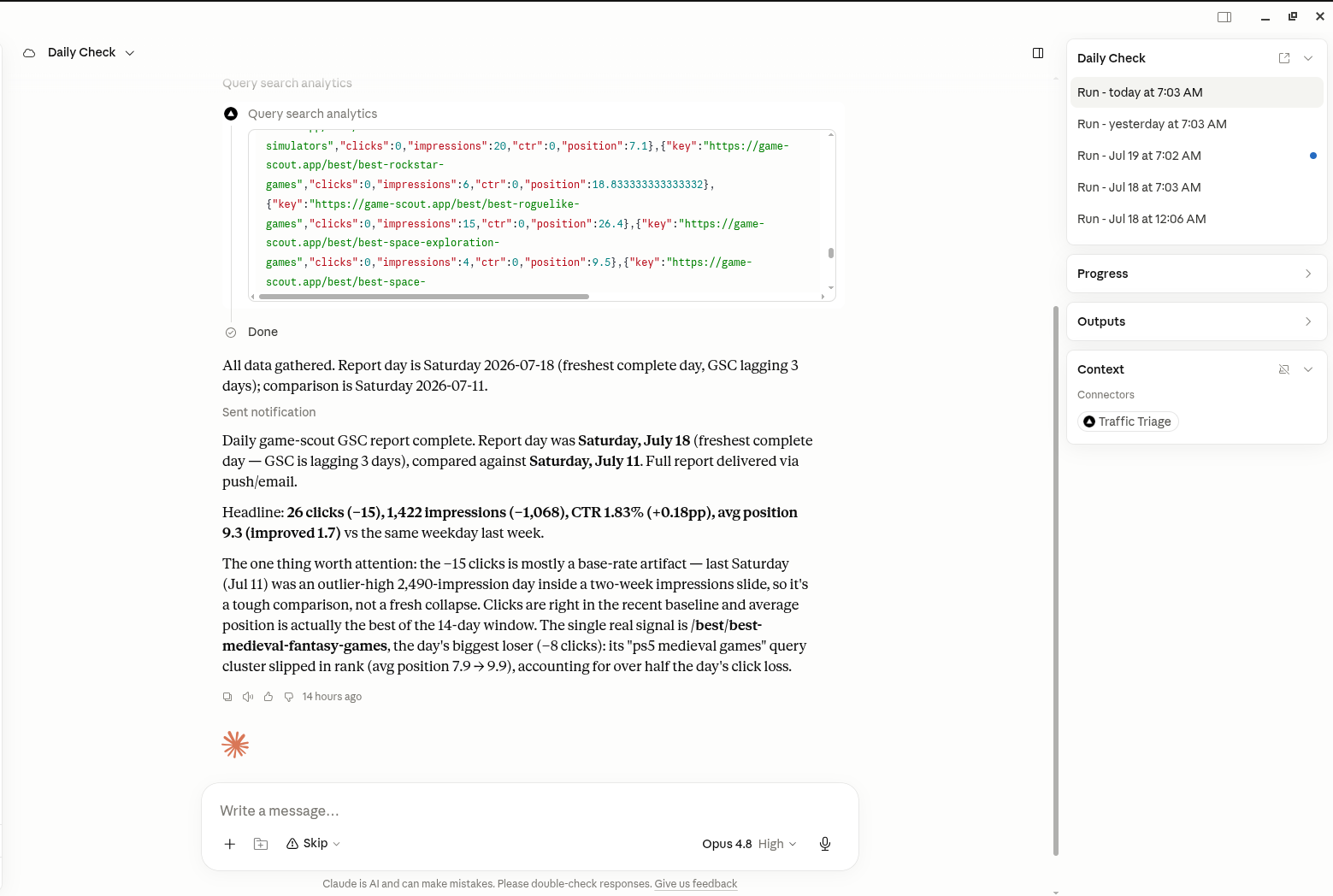
Connect Google Search Console once. Your assistant runs the 8 SEO checks, reads your real clicks and impressions, and tells you what to fix and what to write next. Ours does it on our own sites every morning: the screenshot is a real run.
No signup needed? run the free instant check · see the 8 checks · try the free Search Console report
1,255 clicks
last 28 days on game-scout.app, our own site
measured in Search Console, not an estimate
155 → 1,255
monthly clicks, May to August 2026
the same site, the same measurement, 90 days apart
7:03 every morning
our assistant runs the daily check from chat
scheduled in Claude over MCP, no one at the keyboard
What the connection does
Fixing it once is not the job.
The free check tells you what to fix this week, any time, no signup. Everything below is what an account keeps doing after that: watching what your changes did, telling you what to write next, and answering all of it from the chat you already have open.
It is built for one person: you shipped with Lovable, Bolt, v0, Replit, Framer, or your own Next.js app on Vercel, you have 0 to 100 users, and Google feels like a black box. Not agencies, not sites with traffic, not enterprise SEO teams. The advice comes from launching at zero first-hand, so every verdict is written the way we needed to read it.
We run it on our own site first: game-scout.app went from 155 clicks a month to 1,255 between May and August 2026, and the panels below show its real Search Console data.
Sorted by impressions lost: the homepage is the one page that fell the fortnight after Jul 6.
Pages
Every page you track, one sortable table
Every page you track lands in one table with its clicks, impressions and average position beside the fortnight before, so you can see which pages moved without pulling the Search Console export yourself.
- Clicks, impressions and position, each next to its fortnight-over-fortnight move
- Sort by any column, so the pages that moved most float to the top
- When each page last changed, and whether it existed when tracking began
Write next: a detective pick-order guide. 5,486 impressions land on two lists and the guide slot is empty.
Topical map
Your plumbing passes. Now what do you write?
We build a topical map for your site by hand, from the queries it already touches and the ones it should. Clusters, the pages that exist under each one, and the gaps between them.
- Clusters built from real search data, not a keyword dump
- Every cluster shows what exists and what is missing
- Built for your site, by us, from your own search data
2 topical maps a month on Free, 50 on Pro.
Create a free accountIn your AI assistant
Run it from the chat you already have open
TrafficTriage plugs into Claude, Cursor, and ChatGPT. Your assistant runs the 8 checks, reads your Search Console data, and can check your site every morning without you asking twice.
- Re-run the checks on any site you own, in chat
- Your Search Console numbers, explained, not just dumped
- No API key, nothing to install
200 site checks a month on Free, 2000 on Pro.
See how it worksStart free. Upgrade when you need more room.
Every account starts free, with real limits on each tool. Pro is a flat 9 EUR a month that raises every one of them. No usage-based pricing, no annual plan.
Free
- -1 site connected at once
- -200 site checks a month
- -25 page analyses a month
- -100 SERP lookups a month
- -2 topical maps a month
- -10 tracked pages watched for changes
Pro
9 EUR / month
- -25 sites connected at once
- -2000 site checks a month
- -500 page analyses a month
- -2000 SERP lookups a month
- -50 topical maps a month
- -50 tracked pages watched for changes
Need more than the free check? Deep dive: your 3 strongest pages and your search data analyzed by hand, a comparison against the sites that outrank you, and a prioritized fix list for your traffic problem. 10 EUR, delivered to your email within 2 days.
Questions builders actually ask
- Why is my website not showing up on Google?
- For new sites it's almost always one of a few basics: Google can't read your pages (they're blank until JavaScript runs), a broken or missing sitemap.xml, a robots.txt or noindex tag telling Google to stay away, canonical tags pointing everything at the homepage, or two live versions of your site splitting signals. The free Triage Report checks all of these from your URL and tells you which one is your problem.
- Can you check my site without Search Console access?
- Yes. Every check in the Triage Report works from your public URL alone — no Search Console connection, no OAuth, no analytics access. If you haven't set up Search Console yet, that's fine: once your basics pass, setting it up is usually our first recommendation, and the report tells you exactly why.
- How do I check if Google can crawl my site?
- Quick self-test: open your page, hit view-source (not inspect), and look for your actual text. If you only see a couple of script tags and an empty div, crawlers see nothing. The Triage Report does this properly — raw HTML fetch, robots.txt rules, blocked render assets, and header-level noindex directives — and tells you the result in plain words.
- My site is built with Lovable, Bolt, v0, or Framer — do the checks apply?
- Especially then. We detect your platform and write the verdict for it — for example, a Lovable site that ships empty HTML gets “enable SEO Boost in Settings → Domains & Hosting”, not a lecture about server-side rendering. Vibe-coded and AI-built sites share a handful of recurring issues, and they're exactly what the 8 checks cover.
- Is the free Triage Report actually free?
- Yes. Paste your URL and the full report renders on your screen in about half a minute — free, no signup, no email required. You get all findings — nothing held back behind a paywall. No credit card, no trial.
- What do I get with an account vs. the free check?
- The free check is a one-off you run on the web. A free account saves your report history, lets you connect Google Search Console for the deeper data verdict, and turns TrafficTriage into a tool you run from your AI assistant across every site you own.
- How do I use this inside Claude or Cursor?
- Create a free account, then add traffictriage.com/mcp as an MCP server in Claude, Cursor, or any MCP client. Your assistant can then run the 8 checks and pull a Search Console report for any site, in chat. Full setup is on the MCP server page.
- What if all 8 checks pass?
- Then your plumbing is fine and we say so — the verdict points at the next real question instead: does anyone search for what your pages say? A passing report with zero traffic means it's a content and demand problem, and the report tells you where to start looking.
- What does a subscription give me that the free check does not?
- The free check is one verdict on one site, right now. An account keeps the history, watches what your changes did to your Search Console numbers, gives you a topical map of what to write next, and lets your AI assistant run all of it. Free covers a real amount of that. Pro raises every ceiling for a flat 9 EUR a month.
- If I never pay, does the free check get worse?
- No. The free instant check has no account behind it, no limit, and no signup, and nothing is being held back from it to create a reason to upgrade. Paid adds ceiling and depth on top; it never subtracts.
Stop guessing why Google ignores your site.
Run the free check today, then let your account keep watch.